


How to Hire Candidates with Disabilities: A Practical, 4- Step Recruiter Guide

Updated: May 21
Recruiters know the feeling—you’ve got an open role, a tight timeline, and it seems like the right candidates just aren’t out there. But often, it’s not a talent shortage. It’s a visibility problem. Qualified candidates with disabilities are applying, but many never make it through the process. Not because they aren’t capable, but because the hiring experience wasn’t built with them in mind—from unclear interview steps to limited access for accommodations. Disabled job seekers are ready to work, but hiring systems remain misaligned with their needs—especially around transparency, interviewing, and accommodations.
Think of this as your recruiting playbook: what to look for, what to say, and where small shifts improve outcomes.

Why this Matters
Disability is common: About 1 in 4 people in the U.S. has a disability.
Most disabilities are non-apparent: An estimated 70-80% are non-visible, which means you may already be interviewing disabled candidates without knowing it.
Access drives job decisions: When searching for work, disabled candidates rank accommodations (56.4%), work-life balance (55.8%), and location (54.9%) as extremely important.
Recruiter takeaway: The candidate experience you create directly affects who applies, who stays in the process, and who accepts offers.
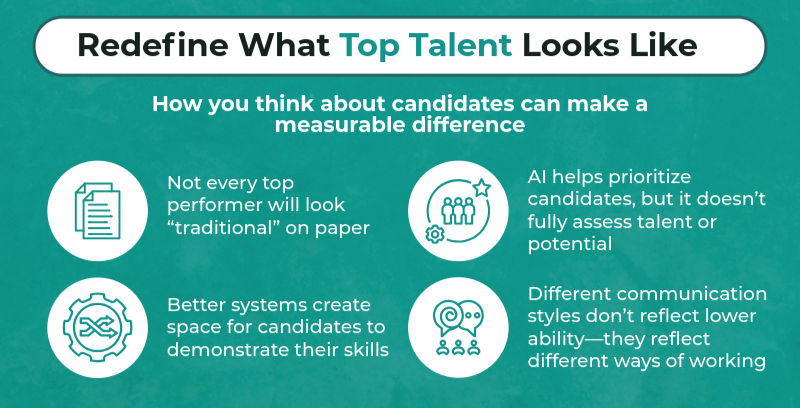
Step 1: Redefine What Top Talent Looks Like and How You Screen

What candidates are telling us
Disabled job seekers report the biggest challenge is simply finding roles they’re qualified for (51.2% extremely challenging) or interested in (44.8% extremely challenging). That often points to how jobs are framed, matched, and filtered—not to a lack of skill.
What to do differently
Screen for measurable skills and qualifications rather than a 'clean resume'. Resume gaps and non-linear paths are common and shouldn’t be an automatic disqualifier.
Focus on essentials. If a requirement isn’t truly necessary to succeed in a role, treat it as flexible in early screens. This includes weight lifting minimums, standing or stamina requirements, and other physical demands, arbitrary years of experience, or scheduling or location requirements. (This is especially important when the posting itself narrows who applies).
Build “second-look” habits. Make time to reconsider candidates who may be strong but don’t present traditionally (formatting, gaps, nonstandard titles, etc.).
Step 2: Use AI Tools Wisely
AI is now embedded in recruiting—resume ranking, matching, chatbots, scheduling, assessments, and sometimes even video interviewing. These tools can help streamline workflows and reduce manual effort, but recruiters should go in knowing they aren’t perfect. AI can introduce bias by filtering out qualified candidates who don’t fit traditional patterns or standardized communication styles, especially since it relies on historical data, rigid criteria, and limited interpretations of candidate behavior.
Where AI Can Help Recruiters
More consistent screening signals: Some tools can reduce bias if they’re designed to ignore factors like demographic details, schools, or addresses.
Expanded outreach and matching: AI-assisted matching can surface candidates from wider sources, including disability-focused communities and partnerships.
Faster candidate experience: Scheduling assistants and chat tools can reduce friction—if they’re accessible.
Where Recruiters Should Be Cautious
Rigid pattern matching: If tools learn from past hiring data, they can replicate old patterns and exclude qualified candidates who don’t fit “the historical mold.”
Accessibility gaps: Some AI-enabled platforms (video interviews, gamified tests) aren’t built with accessibility in mind, disadvantaging people using screen readers, voice input, or needing alternative formats/time.
Misreading communication: Tools that assess tone, facial expressions, body language, or speech patterns can penalize neurodivergent candidates or candidates with speech/mobility disabilities.
Low transparency: Candidates may not know AI is being used, which makes it harder to request accommodations or understand decisions.
Recruiter Practices
Treat AI ranking as a starting point. If someone looks strong but ranks low, scan the profile anyway—especially for transferable skills and outcomes.
If a candidate struggles with a tech step, assume barrier first. Don’t equate platform friction with capability.
Offer alternatives when possible: phone screen instead of video platform, written questions in advance, extra time, or breaks.
Step 3: Attract and Evaluate Candidates Through an Inclusive Lens
Creating an inclusive hiring process means looking closely at how candidates experience your job postings and selection criteria. Start with your job descriptions, a critical (and often overlooked) barrier to entry. Many roles unintentionally exclude qualified candidates with disabilities by including unnecessary requirements, unclear expectations, or overly rigid language.
Prioritize essential functions. Clearly define what the job actually requires, and avoid listing physical demands unless they are truly necessary. When possible, focus on outcomes rather than how tasks must be completed—leaving room for reasonable accommodations.
Simplify and streamline requirements. Long “wish lists,” inflated experience expectations, or strict degree requirements can deter strong candidates. Focus on the core qualifications needed to succeed.
Use plain, accessible language. Reduce jargon, acronyms, and overly complex phrasing so candidates can quickly and confidently understand the role.
Avoid exclusionary language. Phrases like “fast-paced,” “must thrive under pressure,” or “rockstar” can unintentionally discourage applicants. Instead, describe the work environment and support systems in place.
Make accommodations visible and normalized. Include a clear statement that candidates can request accommodations at any stage—and briefly explain how to do so.
Beyond the job description, evaluate how your screening and interview processes may create unnecessary barriers. Standard practices—like timed assessments, video interviews without captions, or rigid scheduling—can disadvantage qualified candidates.
Interviewing is sited as a major obstacle for many disabled candidates (26.2% extremely challenging), while requesting accommodations during the application/interview process also remains a common barrier (31.2% extremely challenging).
What to Know — Common Barriers Recruiters Can Reduce
Unclear steps force candidates to spend energy decoding the process instead of demonstrating skills.
Long, high-pressure interview blocks can create fatigue and cognitive load, reducing performance.
Over-indexing on first impressions can unfairly penalize candidates whose communication style differs (especially with neurodivergence or anxiety).
Instead, build flexibility into your process:
1) Set expectations up front
Share: length, format, topics/question type, who will attend.
Recruiter Screening/Interview Script:
“We can provide accommodations for any stage of the hiring process. If you’d like to request an adjustment, please let us know and we’ll coordinate.”
“Before we jump in, I want to share what to expect from today’s conversation and ask if there’s anything you need to fully participate.”
2) Make interviews navigable
Break up long interviews; add short breaks.
Minimize distractions: quiet space, fewer interruptions.
Use visual aids or written prompts when helpful.
3) Interview for skill, not style
Don’t assume cognitive limitation based on physical disability.
Allow processing time; don’t rush responses.
Focus on answers and outcomes rather than delivery norms (eye contact, speed, “polish”).
Step 4: Get Support & Accommodations Right
Accommodation processes are a defining barrier in workplace success and hiring follow-through. A majority of candidates with disabilities have requested accommodations (60.1%) but 56.8% found the process very or extremely challenging.
Recruiters may not control the policy, but you often control the candidate-facing experience—and that experience determines whether candidates stay engaged.
What recruiters can do
Acknowledge quickly. Even if you’re routing requests to HR/TA Ops, confirm receipt and next steps.
Provide timeline expectations. Candidates consistently cite uncertainty and lack of updates as barriers.
Offer interim adjustments. Breaks, rescheduling flexibility, alternate format.
Normalize accommodations. The goal is access, not “special treatment.”
Support candidates actually find helpful
Candidates reported the most helpful job-search supports as:
Recruiter takeaway: even light-touch guidance (process clarity, sample questions, short prep call) can reduce drop-off and improve interview performance.
Change Your Mindset: Small Shifts with Measurable Impact
From “perfect fit” → “qualified potential”
From “the system filtered them out” → “take a closer look”
From “accommodations are extra” → “access enables performance”
From “communication style = capability” → “focus on outcomes”
From “hard-to-find talent” → “talent we haven’t reached yet”
Recruiter Inclusion Checklist
Before you post / source
Job requirements reflect essentials
Outreach includes disability-focused channels/partners
Before the interview
Invite includes format, timing, attendees, and what to expect
Accommodation options are clearly offered
During evaluation
Focus on outcomes and skills, not “polish” or speed
AI rankings inform review, but don’t replace it
After an accommodation request
Confirm receipt and next steps quickly
Provide updates—silence is a documented barrier
Why partner with Disability Solutions
Disability Solutions helps recruiting teams expand top-of-funnel access to qualified candidates with disabilities through job distribution and targeted partner outreach.

Jobs are posted on the Disability Solutions job board
Roles are shared through a partner network (including community-based organizations that support job seekers with disabilities)
Candidates apply through your ATS
You recruit, screen, and hire as usual
Why recruiters (and employers) like it
Broader reach to an often overlooked talent pool Connect with qualified candidates you’re unlikely to reach through traditional sourcing channels—expanding both diversity and candidate quality.
Lower cost per hire According to SHRM, the average cost-per-hire is $4,700, but Disability Solutions customers typically save 50% or more per hire by improving targeting and reducing time-to-fill.
Stronger retention outcomes Employees with disabilities are more likely to stay when they feel supported. Our focus on inclusion and access contributes to 15% higher retention rates, helping reduce turnover and re-hiring costs.
Faster, more efficient sourcing Targeted outreach and partner networks deliver more relevant candidates upfront, reducing time spent screening and sourcing.
Seamless integration with your workflow No need to redesign your hiring process—continue using your ATS while expanding your pipeline with qualified, engaged candidates.


Comments